
Appearance
Build Crystal Project
Writen by Chunxiao Xu, PhD
Install Visual Studio, 2017 or above versions. Visual Studio - 2019、2017、2015
Install CUDA,both version 11 and 12 are ok.CUDA Toolkit Archive | NVIDIA Developer
Install Qt 6.Try Qt | Develop Applications and Embedded Systems | Qt
Install Python development environment (Anaconda management is recommended).Download Anaconda Distribution | Anaconda
How to build Crystal with Python support
Choose Python bindings and fill the path of the python interpreter. You would better fill the path when you choose Python bindings (before configuration), or the compiler may generate the wrong version of PYD file.
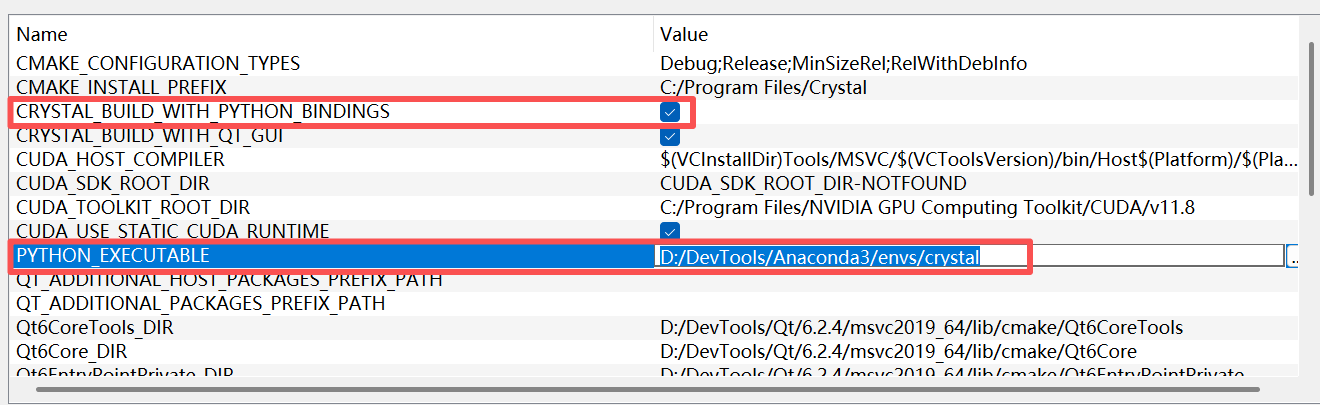
Then configure it and select the newly emerged two option:

Compile the pycrystal_core project:
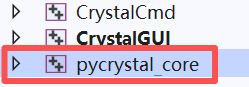
And you can found [pycrystal_core.cp39-win_amd64.pyd].
Put it in: Crystal/Scripts/pycrystal/pystal/win or linux (depending on your compiling operating system)