
Appearance
Crystal Documentation
Use this manual to open and inspect a volume, prepare a reproducible scene, work with segmentation labels, or build and extend Crystal.
中文速查 第一次使用请从 Engine-KM 示例 开始。导入 CT、调整强度范围和体素间距见 体数据与场景,为分割标签着色或按框选删除体素见 转换函数与分割。查看和训练模型见 3DGS 工作流。
Start with a task
| I want to… | Open this guide | What I should have at the end |
|---|---|---|
| Try Crystal with the bundled data | Software Operation | A visible Engine-KM render and a live sample count |
| Load my own CT and preserve spacing | Volumes and Scenes | A saved scene and a verified, reopenable volume |
| Reveal tissue or color segmentation labels | Transfer Functions and Segmentation | A continuous intensity map or an exact-label mask overlay |
| Remove everything under a screen rectangle | Rectangle volume deletion | An inspected preview and a saved deletion sidecar |
| Inspect or refine a 3D Gaussian model | 3D Gaussian Splatting | A locally viewed model or a separately saved training result |
| Configure CMake and run regressions | Build Crystal Project | A runnable Release directory and a repeatable test command |
| Find the owner of an algorithm or resource | Code Structure | A map from entry point to source directory and runtime owner |
Choose an entry point
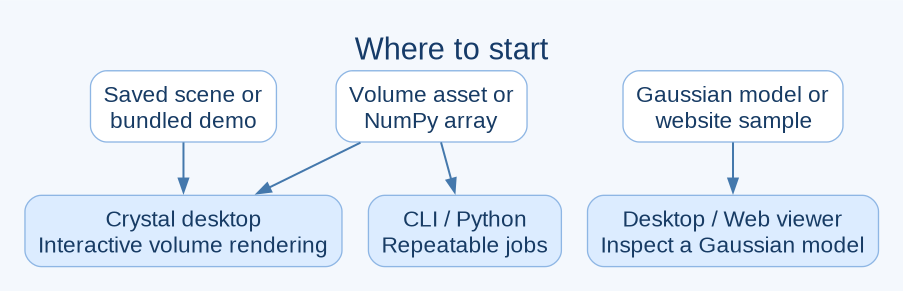
Figure 1. The asset determines where to begin. A scene resumes a rendering session. An INFORAW starts with voxel data. A Gaussian model opens in a model viewer.
- Try it in your browser. Open the Crystal homepage and select a published 3DGS sample.
- Work with your own data. Start Crystal desktop. Use a packaged demo first to establish a baseline, then open your XML/JSON or import an INFORAW volume.
- Repeat a workflow in code. Use the headless CLI and Python examples. Use Datasets to choose a volume and review its provenance.
Read the diagrams
The module overview identifies source ownership. The render lifecycle follows a frame from scene configuration through Film and the viewport. The data guides then zoom in on grid conversion, material mapping, and Gaussian model production.
The desktop Help menu also opens the architecture reference shipped with the installed build. It includes the module index and generated include dependencies for that build.